


Want to make your videos look like they belong on the big screen? You’re in the right place.
Creating cinematic videos used to take expensive gear and hours of editing. But now, with Invideo AI and Veo, you can turn simple clips into stunning cinematic masterpieces quickly and easily. Imagine describing your vision in a few words and watching AI bring it to life with lifelike characters, smooth motion, and perfect lighting. Ready to unlock your creativity and impress your audience? Let me show you exactly how to create cinematic videos with Veo that grab attention and tell your story like a pro. Start transforming your videos today with Invideo AI.
Introduction To Veo And Cinematic Video Creation
Creating cinematic videos has become more accessible with new AI tools. Veo offers a simple way to turn ideas into stunning videos. This section introduces Veo and explains why cinematic videos attract attention in today’s world. You will also learn how Veo uses AI to help create these videos easily.
What Is Veo And Its Purpose In Video Creation
Veo is an AI-powered video generation tool designed to create videos from text and images. It works through the Google Vertex AI platform, allowing users to generate new video content quickly.
The main purpose of Veo is to transform simple prompts into engaging video clips. This helps creators save time and effort while producing high-quality visual content.
- Generates videos from text descriptions and images
- Supports Google Cloud console and Vertex AI API
- Offers multiple video variations for each prompt
Why Cinematic Videos Matter In Today’s Visual Content
Cinematic videos stand out with their storytelling style and visual appeal. They create a strong emotional impact on viewers and keep their attention longer.
In digital marketing, cinematic videos:
- Enhance brand storytelling
- Increase viewer engagement
- Improve message retention
- Raise content quality perception
With so much online content, cinematic videos help you connect with your audience better.
Overview Of Veo’s Ai-powered Video Generation
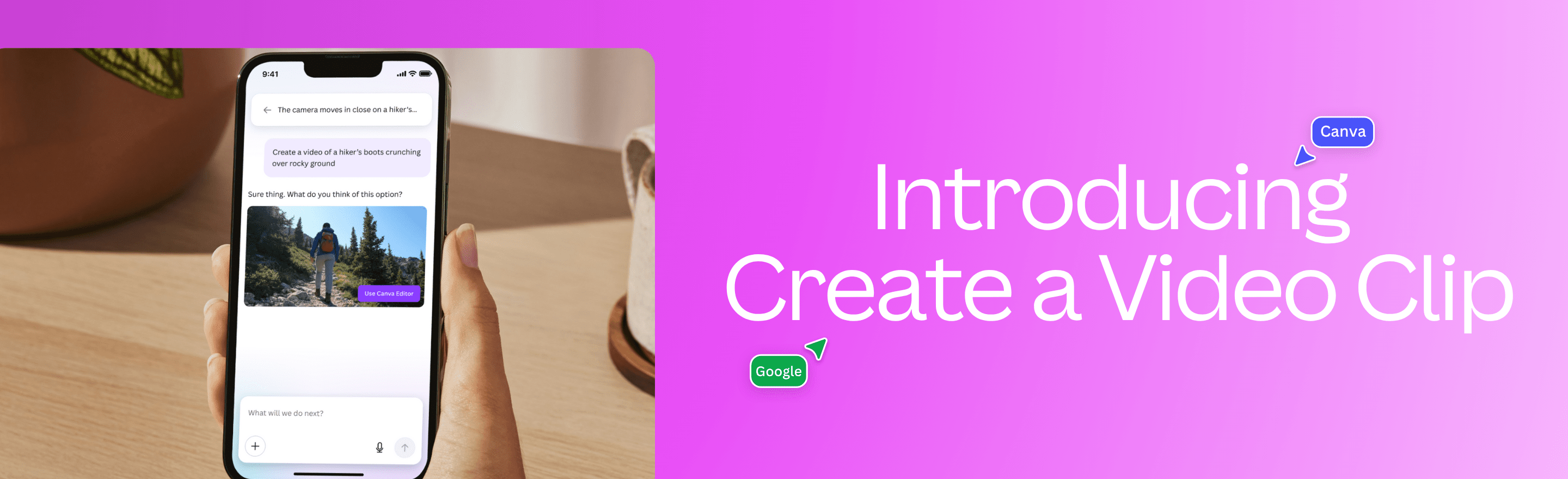
Veo uses advanced AI to generate videos based on user input. You provide a detailed text prompt or an image, and Veo creates a cinematic video that matches your vision.
| Feature | Description |
|---|---|
| Input | Text prompts and images |
| Process | AI analyzes prompts to generate video scenes |
| Output | High-quality cinematic video clips |
| Variations | Multiple video options to choose from |
This AI-driven approach simplifies video creation, making cinematic videos possible for all skill levels.
Credit: www.canva.com
Key Features Of Veo That Enhance Cinematic Video Production
Veo offers powerful tools that simplify creating cinematic videos. Its advanced technology helps users produce stunning visuals with ease.
These features focus on flexibility, customization, and smart AI assistance. They enable video creators to bring their ideas to life quickly and effectively.
Ai-driven Text-to-video And Image-to-video Generation
Veo uses artificial intelligence to turn text descriptions or images into videos. This feature lets creators generate cinematic scenes without filming.
- Describe your vision in simple text to start the process.
- Upload an image to serve as the video’s base.
- The AI creates dynamic video content based on your input.
This method saves time and opens new creative possibilities for all skill levels.
Customizable Visual Elements: Faces, Clothing, And Motion
Users can personalize key visual elements to fit their story. Veo allows easy editing of:
- Faces – Change expressions or appearance.
- Clothing – Select styles and colors.
- Motion – Adjust how characters move and interact.
Such customization helps produce unique and engaging cinematic experiences.
Multiple Video Variations For Creative Flexibility
Veo generates several video versions from the same prompt. This gives creators options to:
- Compare different styles and edits.
- Select the best fit for their project.
- Experiment with storytelling techniques.
This feature encourages creativity and helps refine video quality.
Integration With Google Cloud And Vertex Ai Ecosystem
Veo works seamlessly with Google Cloud and Vertex AI. This integration offers:
| Benefit | Description |
|---|---|
| Scalability | Handle large video projects efficiently. |
| API Access | Use Vertex AI API for custom workflows. |
| Cloud Storage | Securely save and manage video assets. |
This setup supports professional-grade cinematic video creation in the cloud environment.
How Veo Simplifies The Cinematic Video Creation Process
Veo streamlines cinematic video production by combining powerful AI tools with an easy workflow. It allows creators to generate high-quality videos using simple text and image prompts. The process is clear and fast, making professional video creation accessible to everyone.
Users focus on creativity while Veo handles complex video generation tasks. This reduces time and effort, producing consistent, lifelike scenes and characters. Every step, from guiding the AI to downloading the final video, is designed for simplicity and control.
Crafting Detailed Prompts To Guide Video Generation
Creating a cinematic video starts with a clear, detailed prompt. Veo uses text and image inputs to understand your vision. A well-crafted prompt includes:
- Scene description with mood and lighting
- Character actions and emotions
- Visual style preferences
Veo’s AI reads these details to generate videos that match your ideas closely. You can refine prompts to explore different styles or story angles. This control helps create videos that feel unique and polished.
Leveraging Ai For Consistent And Lifelike Characters
Veo’s AI ensures characters look natural and behave realistically. It maintains consistency across scenes, avoiding sudden changes in appearance or motion. Features include:
- Realistic facial expressions and gestures
- Stable character design throughout the video
- Smooth interaction with the environment
This technology saves hours of manual editing. It makes characters believable and engaging, enhancing the cinematic experience.
Controlling Camera Movements And Scene Transitions
Veo offers intuitive tools to manage camera angles and transitions. You can specify:
- Camera position and movement paths
- Zoom and focus points
- Transition types between scenes
These controls add depth and flow to your video. They help to tell your story visually, creating dynamic and immersive scenes.
Downloading And Using Finished Videos Effortlessly
Once the video generation completes, Veo makes downloading simple. The platform supports multiple formats and resolutions. Benefits include:
| Feature | Benefit |
|---|---|
| Multiple file formats | Compatible with various editing tools and platforms |
| High resolution | Ensures clear, professional-quality video output |
| Fast download | Quick access to your finished project |
You can immediately use the videos for presentations, social media, or further editing. Veo removes technical barriers, letting creators focus on sharing their stories.

Credit: www.diyphotography.net
Pricing And Affordability Breakdown
Creating cinematic videos with Veo combines advanced AI technology and cloud computing. Understanding the pricing and affordability helps plan your video projects well. This section explains Veo’s costs on Google Cloud, compares them with traditional methods, and shares tips to get the best value.
Overview Of Veo’s Pricing Structure On Google Cloud
Veo runs on Google Cloud’s Vertex AI, which charges based on video generation time and resource use. Pricing depends on the length and complexity of your video.
| Service | Cost Basis | Estimated Price |
|---|---|---|
| Video Generation | Per minute of generated video | $0.10 – $0.30 |
| Storage | Per GB per month | $0.02 |
| API Requests | Per 1,000 requests | $0.50 |
Costs vary with video resolution and usage scale. Small projects remain affordable.
Cost Comparison With Traditional Video Production Methods
Traditional video production needs cameras, crews, and editing software. These costs add up quickly:
- Equipment rental: $500 – $2,000 per day
- Professional crew: $1,000+ per day
- Editing software: $20 – $50 monthly
Veo reduces costs by automating video creation through AI. No need for physical equipment or large teams.
Example: A 5-minute cinematic video may cost $10 with Veo but over $2,000 traditionally.
Budgeting Tips For Maximizing Value With Veo
Plan your video length carefully. Shorter videos cost less and are quicker to produce.
- Use clear, concise prompts to avoid extra re-runs.
- Choose standard resolutions instead of 4K to save money.
- Monitor your Google Cloud usage regularly.
- Delete unused videos to reduce storage fees.
These steps help keep your project within budget without losing quality.
Availability Of Free Or Trial Versions For Beginners
Veo offers a free trial via Google Cloud’s Vertex AI platform. Beginners get access to:
- Limited video generation minutes
- Basic storage and API usage
- Access to prompt guides and tutorials
This trial helps users test Veo’s capabilities before spending money.
Sign up on Google Cloud to start your free trial and explore Veo’s features risk-free.
Pros And Cons Of Using Veo For Cinematic Videos
Veo offers a powerful way to create cinematic videos using AI technology. It helps users transform simple ideas into visual stories quickly. Like all tools, Veo has strengths and weaknesses. Understanding these will help you decide if it fits your video goals.
Advantages: Speed, Creativity, And Accessibility
Speed: Veo generates videos fast. You only need to give a text or image prompt. The AI then creates multiple video versions to choose from. This saves hours of editing time.
Creativity: The AI can add cinematic effects and styles. It helps bring your vision to life even if you lack advanced editing skills. Veo offers fresh ideas and visual diversity.
Accessibility: No need for expensive software or hardware. Veo works through Google Cloud and the Vertex AI API. Anyone with internet access can create cinematic videos easily.
Limitations: Video Length, Customization Boundaries, And Learning Curve
- Video Length: Veo currently supports short clips. Longer projects require manual stitching or other tools.
- Customization Boundaries: Options for fine-tuning visuals are limited. The AI controls many creative aspects, restricting detailed edits.
- Learning Curve: Understanding how to write effective prompts takes time. Beginners may need practice to get the best results.
Real-world User Experiences And Feedback
Users praise Veo’s quick output and ease of use. Many highlight how it sparks creativity without needing deep video skills. Some users note it is perfect for social media and short marketing clips.
Others mention the challenge of limited control over final video details. A few report needing multiple tries to get the desired look. Overall, Veo receives positive reviews for beginner-friendly AI video creation.
Common Challenges And How To Overcome Them
- Challenge: Getting the right cinematic style from prompts.
Solution: Experiment with different descriptive words. Use the Veo prompt guide for tips. - Challenge: Handling video length limits.
Solution: Create multiple short clips and combine them with editing software. - Challenge: Limited customization options.
Solution: Use Veo for initial drafts, then refine with traditional editors. - Challenge: Learning to use the AI effectively.
Solution: Start with simple prompts and review AI outputs. Gradually increase complexity.

Credit: www.youtube.com
Ideal Use Cases And Recommendations For Veo Users
Veo provides a powerful AI-driven platform to create cinematic videos easily. Understanding the best use cases helps users maximize its potential. This section outlines ideal scenarios and tips to enhance your video projects using Veo.
Perfect Scenarios For Marketing And Social Media Content
Veo excels at producing engaging videos for marketing campaigns and social media. Its AI generates cinematic visuals that grab attention quickly.
- Product demos: Showcase features with smooth, professional clips.
- Brand storytelling: Create emotional, visual stories to connect with audiences.
- Social ads: Craft eye-catching short videos optimized for platforms like Instagram and Facebook.
Using Veo for social content boosts viewer engagement and brand recall.
Best Practices For Filmmakers And Content Creators
Filmmakers and creators benefit from Veo’s AI to speed up production. Follow these tips:
- Clear prompts: Write detailed text descriptions for precise video generation.
- Multiple variations: Generate several versions to pick the best fit.
- Post-editing: Use video editors to refine color, sound, and transitions.
This approach saves time and adds a cinematic feel without complex equipment.
How Educators And Trainers Can Benefit From Cinematic Videos
Educational videos gain impact with cinematic styles. Veo helps trainers create:
- Engaging tutorials: Present lessons with clear visuals and storytelling.
- Course trailers: Attract learners with dynamic previews.
- Demonstrations: Show step-by-step processes in an appealing format.
Cinematic videos increase learner attention and improve knowledge retention.
Tips For Enhancing Video Quality And Engagement
| Tip | Description |
|---|---|
| Use high-quality prompts | Describe scenes clearly with specific details for better video output. |
| Optimize lighting and color | Adjust brightness and contrast in post-production for a professional look. |
| Add background music | Choose suitable tracks to set the mood and keep viewers engaged. |
| Keep videos concise | Short, clear videos retain attention and improve sharing potential. |
Following these tips enhances the cinematic appeal and viewer experience.
Conclusion: Elevating Video Content With Veo’s Cinematic Capabilities
Veo’s cinematic tools bring a fresh dimension to video creation. It simplifies the process of producing professional-looking videos. Through AI, Veo transforms simple footage into visually stunning content that captures attention.
Creators gain access to powerful features without complex editing. This allows focusing on storytelling and creativity. The result is videos that feel polished and cinematic, enhancing audience engagement.
Recap Of Veo’s Unique Benefits
- AI-powered video generation: Create cinematic videos from simple text and images.
- Multiple variations: Explore different styles and edits automatically offered by Veo.
- User-friendly interface: No need for advanced technical skills or software.
- Time-saving: Produce high-quality videos quickly, ideal for marketers and content creators.
- Integration with Vertex AI: Access powerful cloud-based video generation tools.
Future Trends In Ai-powered Video Creation
AI video creation continues to evolve rapidly. Expect more personalized and adaptive content that adjusts to audience preferences. Real-time editing and instant cinematic effects will become common.
Cloud platforms like Google Vertex AI will enhance scalability and collaboration. Creative tools will become more intuitive, helping users generate videos with minimal effort.
| Trend | Impact | Benefit |
|---|---|---|
| Real-time AI editing | Instant cinematic effects during recording | Faster production, less post-editing |
| Adaptive video content | Content changes based on viewer data | Higher engagement and relevance |
| Cloud-based collaboration | Multiple users edit from anywhere | Improved teamwork and creativity |
Encouraging Experimentation And Creative Exploration
Veo invites creators to try new ideas freely. Experiment with different prompts to see varied cinematic styles. Testing helps discover unique video looks and storytelling methods.
Use Veo’s AI variations to compare effects quickly. Combine images and text creatively for fresh outcomes. This exploration leads to better skills and more engaging content.
Remember, creativity thrives with practice and curiosity. Veo supports this journey by making cinematic video creation accessible and fun for all users.
Frequently Asked Questions
How To Turn Video Into Cinematic Video?
To turn a video into a cinematic video, enhance lighting, use color grading, add depth with shallow focus, and apply smooth camera movements. Incorporate a story-driven edit and use cinematic music to elevate mood and engagement.
How To Put A Video In Cinematic Mode?
Open the Camera app on your iPhone. Swipe to select Cinematic mode. Adjust settings if needed. Tap Record or press a volume button to start.
How To Create Videos Using Veo?
Create videos using Veo by entering detailed text and image prompts on Vertex AI. Use the Google Cloud console or API to generate and download videos.
How To Get A Cinematic Look In Video?
Use a shallow depth of field, shoot at 24fps, apply color grading, use cinematic lighting, and compose shots thoughtfully.
Conclusion
Creating cinematic videos with Veo is simple and fun. Start with a clear idea. Use Invideo AI to turn your vision into reality. The tool helps generate videos fast and easy. You can pick from different versions to find the best one. Download your video and share it with friends or on social media. Try it today and see how it works for you. For a smooth start, visit Invideo AI and begin crafting your cinematic story now.
